Skip to content
YOUR PAYROLL WORKSPACE

Enhanced pay stub maker.

Use separate rows for regular pay, overtime and other earnings. Enter and inspect the period through Simple Form or Live Builder.

2025–2026 estimatesActual-record optionsPreview before checkout
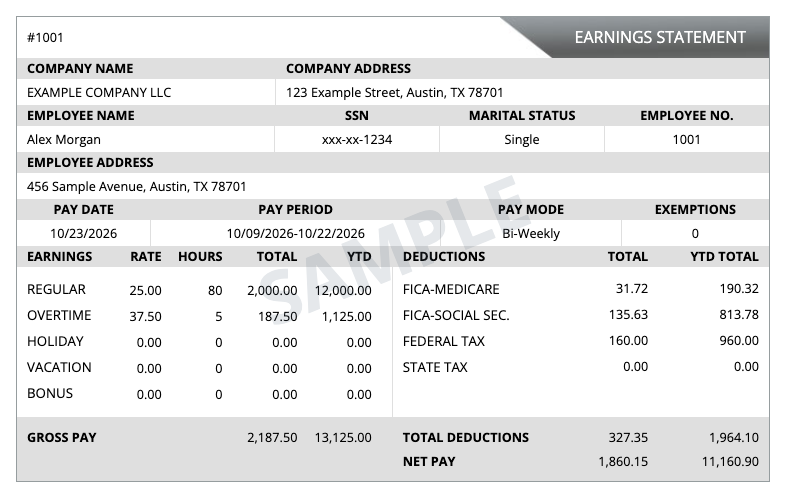
Enhanced pay stub template with fictional company, employee, earnings and deduction details, marked SampleView sampleTap to enlarge
Enhanced template
Email Address: *
Tax State
Auto Calculation
New Employee YTD Applicable if started after Jan 1st
Paystubs Required
Deposit Slip (0.99$)
Swipe the form below left or right View and fill in all pay stub fields.
Tap Hint
# EARNINGS STATEMENT
COMPANY NAME COMPANY ADDRESS
EMPLOYEE NAME SSN MARITAL STATUS EMPLOYEE NO.
xxx-xx-
EMPLOYEE ADDRESS
PAY DATE PAY PERIOD PAY MODE EXEMPTIONS
-
EARNINGS RATE HOURS TOTAL YTD DEDUCTIONS TOTAL YTD TOTAL
REGULAR FICA-MEDICARE
OVERTIME FICA-SOCIAL SEC.
HOLIDAY FEDERAL TAX
VACATION STATE TAX
BONUS
FLOAT
GROSS PAY TOTAL DEDUCTIONS
NET PAY

Inspect the statement against the actual payroll details before moving to checkout.

Pay Stub 2

  • Check No.
  • Pay Date
  • Pay Period
  • No. Of Hours — Regular
  • No. Of Hours — Overtime
  • No. Of Hours — Holiday
  • No. Of Hours — Vacation
  • No. Of Hours — Bonus
  • No. Of Hours — Float

Pay Stub 3

  • Check No.
  • Pay Date
  • Pay Period
  • No. Of Hours — Regular
  • No. Of Hours — Overtime
  • No. Of Hours — Holiday
  • No. Of Hours — Vacation
  • No. Of Hours — Bonus
  • No. Of Hours — Float

Pay Stub 4

  • Check No.
  • Pay Date
  • Pay Period
  • No. Of Hours — Regular
  • No. Of Hours — Overtime
  • No. Of Hours — Holiday
  • No. Of Hours — Vacation
  • No. Of Hours — Bonus
  • No. Of Hours — Float

Pay Stub 5

  • Check No.
  • Pay Date
  • Pay Period
  • No. Of Hours — Regular
  • No. Of Hours — Overtime
  • No. Of Hours — Holiday
  • No. Of Hours — Vacation
  • No. Of Hours — Bonus
  • No. Of Hours — Float

Pay Stub 6

  • Check No.
  • Pay Date
  • Pay Period
  • No. Of Hours — Regular
  • No. Of Hours — Overtime
  • No. Of Hours — Holiday
  • No. Of Hours — Vacation
  • No. Of Hours — Bonus
  • No. Of Hours — Float

Pay Stub 7

  • Check No.
  • Pay Date
  • Pay Period
  • No. Of Hours — Regular
  • No. Of Hours — Overtime
  • No. Of Hours — Holiday
  • No. Of Hours — Vacation
  • No. Of Hours — Bonus
  • No. Of Hours — Float

Pay Stub 8

  • Check No.
  • Pay Date
  • Pay Period
  • No. Of Hours — Regular
  • No. Of Hours — Overtime
  • No. Of Hours — Holiday
  • No. Of Hours — Vacation
  • No. Of Hours — Bonus
  • No. Of Hours — Float

Pay Stub 9

  • Check No.
  • Pay Date
  • Pay Period
  • No. Of Hours — Regular
  • No. Of Hours — Overtime
  • No. Of Hours — Holiday
  • No. Of Hours — Vacation
  • No. Of Hours — Bonus
  • No. Of Hours — Float

Pay Stub 10

  • Check No.
  • Pay Date
  • Pay Period
  • No. Of Hours — Regular
  • No. Of Hours — Overtime
  • No. Of Hours — Holiday
  • No. Of Hours — Vacation
  • No. Of Hours — Bonus
  • No. Of Hours — Float

Pay Stub 11

  • Check No.
  • Pay Date
  • Pay Period
  • No. Of Hours — Regular
  • No. Of Hours — Overtime
  • No. Of Hours — Holiday
  • No. Of Hours — Vacation
  • No. Of Hours — Bonus
  • No. Of Hours — Float

Pay Stub 12

  • Check No.
  • Pay Date
  • Pay Period
  • No. Of Hours — Regular
  • No. Of Hours — Overtime
  • No. Of Hours — Holiday
  • No. Of Hours — Vacation
  • No. Of Hours — Bonus
  • No. Of Hours — Float

Inspect the statement against the actual payroll details before moving to checkout.

Inspect the statement against the actual payroll details before moving to checkout.

PAY DETAILS, WITH ROOM FOR MORE

A check stub maker with room for additional earnings.

Use Enhanced when the payment record needs separate rows for regular earnings, overtime, holiday or vacation pay, bonuses and other amounts. Enter the supported payroll details and check deductions and YTD totals in the live worksheet. The preview is free; the PDF is $6.99 USD per stub, with an optional deposit slip charged separately.

  1. 01

    Organize each earning

    Sort the pay-period records into regular and additional earning types before entering them. Have the employer and worker details, address, dates, pay rates and actual hours ready for each period.

  2. 02

    Check current and YTD amounts

    Match the rates, hours and amounts to the source records. Inspect the deduction lines for the current period and the cumulative balances separately.

  3. 03

    Preview every pay period

    Compare the complete preview with the payroll record, including net pay. After confirmation of payment, save or print the PDF and retain the private link in the delivery email.

ENHANCED PAY STUB QUESTIONS

Choose the worksheet that fits your records.

What is the difference between Regular and Enhanced?
Enhanced provides separate earning rows and an employee address field. If a simpler hourly-or-salary record is enough, compare the Regular worksheet. Choose according to the information that needs to appear.
How much does an Enhanced pay stub cost?
Each Enhanced stub costs $6.99 USD after a free preview. Stub quantity and optional deposit slips determine the order amount. Inspect that total before continuing to PayPal.
How do I enter overtime and additional earnings?
Use the appropriate earning row and the actual rate, hours or amount for that period. The worksheet presents the figures supplied; choosing an overtime label does not establish the legally applicable hours or rate.
Can I prepare several pay periods together?
Prepare more than one period by selecting the stub quantity. Reconcile each set of dates, hours and additional earnings individually, and distinguish each current payment from its cumulative YTD balance.
Can I choose another template or customize its appearance?
This page is the Enhanced worksheet. For nine presentation choices with font and color controls, compare the guided Pay Stub Maker and its design and pricing page.
Where can I find a previous pay stub?
Use order lookup for a paid Regular or Enhanced document purchased here. This worksheet does not retrieve employer-issued statements or access a bank account; obtain those records through the employer.