Skip to content
YOUR PAYROLL WORKSPACE

Regular check stub maker.

Create a check stub for hourly or salary pay from your records. Enter earnings, deductions and YTD totals with Simple Form or Live Builder.

2025–2026 estimatesActual-record optionsPreview before checkout
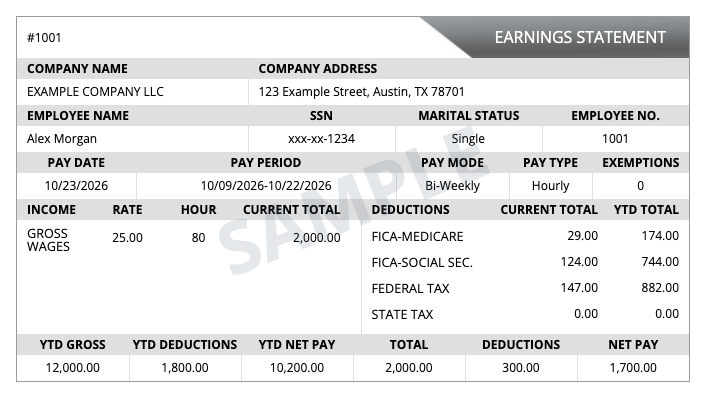
Regular pay stub template with fictional company, employee, earnings and deduction details, marked SampleView sampleTap to enlarge
Regular template
Email Address: *
Tax State
Auto Calculation
New Employee YTD Applicable if started after Jan 1st
Paystubs Required
Deposit Slip (0.49$)
Swipe the form below left or right View and fill in all pay stub fields.
Tap Hint
# EARNINGS STATEMENT
COMPANY NAME COMPANY ADDRESS
EMPLOYEE NAME SSN MARITAL STATUS EMPLOYEE NO.
xxx-xx-
PAY DATE PAY PERIOD PAY MODE PAY TYPE EXEMPTIONS
-
INCOME RATE HOUR CURRENT TOTAL DEDUCTIONS CURRENT TOTAL YTD TOTAL
GROSS WAGES FICA-MEDICARE
FICA-SOCIAL SEC.
FEDERAL TAX
STATE TAX
YTD GROSS YTD DEDUCTIONS YTD NET PAY TOTAL DEDUCTIONS NET PAY

Preview your document before checkout. Review all details against your payroll records.

Pay Stub 2

  • Check No.
  • Pay Date
  • Pay Period
  • No. Of Hours

Pay Stub 3

  • Check No.
  • Pay Date
  • Pay Period
  • No. Of Hours

Pay Stub 4

  • Check No.
  • Pay Date
  • Pay Period
  • No. Of Hours

Pay Stub 5

  • Check No.
  • Pay Date
  • Pay Period
  • No. Of Hours

Pay Stub 6

  • Check No.
  • Pay Date
  • Pay Period
  • No. Of Hours

Pay Stub 7

  • Check No.
  • Pay Date
  • Pay Period
  • No. Of Hours

Pay Stub 8

  • Check No.
  • Pay Date
  • Pay Period
  • No. Of Hours

Pay Stub 9

  • Check No.
  • Pay Date
  • Pay Period
  • No. Of Hours

Pay Stub 10

  • Check No.
  • Pay Date
  • Pay Period
  • No. Of Hours

Pay Stub 11

  • Check No.
  • Pay Date
  • Pay Period
  • No. Of Hours

Pay Stub 12

  • Check No.
  • Pay Date
  • Pay Period
  • No. Of Hours

Preview your document before checkout. Review all details against your payroll records.

Preview your document before checkout. Review all details against your payroll records.

BEFORE YOU BEGIN

Make a check stub from your payroll records.

Use the Regular check stub maker to bring company, employee, pay-period, earnings and deduction details into one familiar earnings statement. Enter hourly rates and hours worked or salary details, then review current and year-to-date totals against your payroll records. Preview your document free, then pay $4.99 USD per pay stub when you are ready to download. Deposit slips are optional.

  1. 01

    Gather your details

    Have your company and employee information, pay dates, pay periods, hourly rate or salary, hours worked, deductions and year-to-date totals ready. Use the pay stub preparation checklist to organize your records.

  2. 02

    Review the worksheet

    Choose Simple Form or Live Builder, enter your details and check each pay period. Compare calculated estimates with your payroll records, including federal income tax and FICA deductions.

  3. 03

    Keep your finished PDF

    Review the free preview before checkout. After payment, download or print your completed pay stubs and keep the private order link from your confirmation email for later access.

REGULAR PAY STUB QUESTIONS

Know what to expect before checkout.

How much does a Regular pay stub cost?
A Regular pay stub costs $4.99 USD per pay stub as a one-time purchase. You can preview before paying. An optional deposit slip adds to the order total; review the total before continuing to PayPal.
Can I preview my pay stub before I pay?
Yes. Enter your details and open the preview to check your document before checkout. Review names, pay dates, earnings, deductions and totals for every pay period before purchasing the finished PDF.
Can I prepare several pay periods in one order?
Yes. Select the number of pay stubs required and check the pay date, pay period and hours for each one. Pricing is per pay stub, so the order total changes with the number of stubs and any deposit slips added.
What is the difference between current and YTD totals?
Current amounts relate to the paycheck being prepared. Year-to-date (YTD) totals are cumulative for the year. Check both against your records rather than copying the same figures into each column. The guide to reading a pay stub explains the main fields.
Which paystub generator fits my records?
Regular keeps the familiar live worksheet for hourly or salary pay. Choose Enhanced pay stub maker for a worksheet with additional earnings fields, including overtime. The newer Pay Stub Maker offers six templates with color and font choices. Compare the templates and pricing before choosing.
Can this retrieve a pay stub from my employer or bank?
This builder creates a document from the information you supply; it does not connect to employer payroll or bank accounts. To find an employer-issued statement, follow the direct-deposit pay stub retrieval guide. For an earlier paid Regular or Enhanced order from this website, use Retrieve an order.